Connecting your apps
Nodearr connects to the Arr apps you already run. It reads their libraries and registers itself as an indexer and a download client. Your apps can then find and import files shared by your friends.
Adding an app
Section titled “Adding an app”To connect an app:
- In Nodearr, go to Settings > Apps and select +.
- Choose your library app. For Whisparr, choose the connection type for the version you run. Fill in the fields described in this section.
- Select Test to check the address, API key, app type and supported version.
- Select Save. Nodearr registers itself in the app and imports its library. A large library can take a few minutes.
What to fill in
Section titled “What to fill in”See the connection form
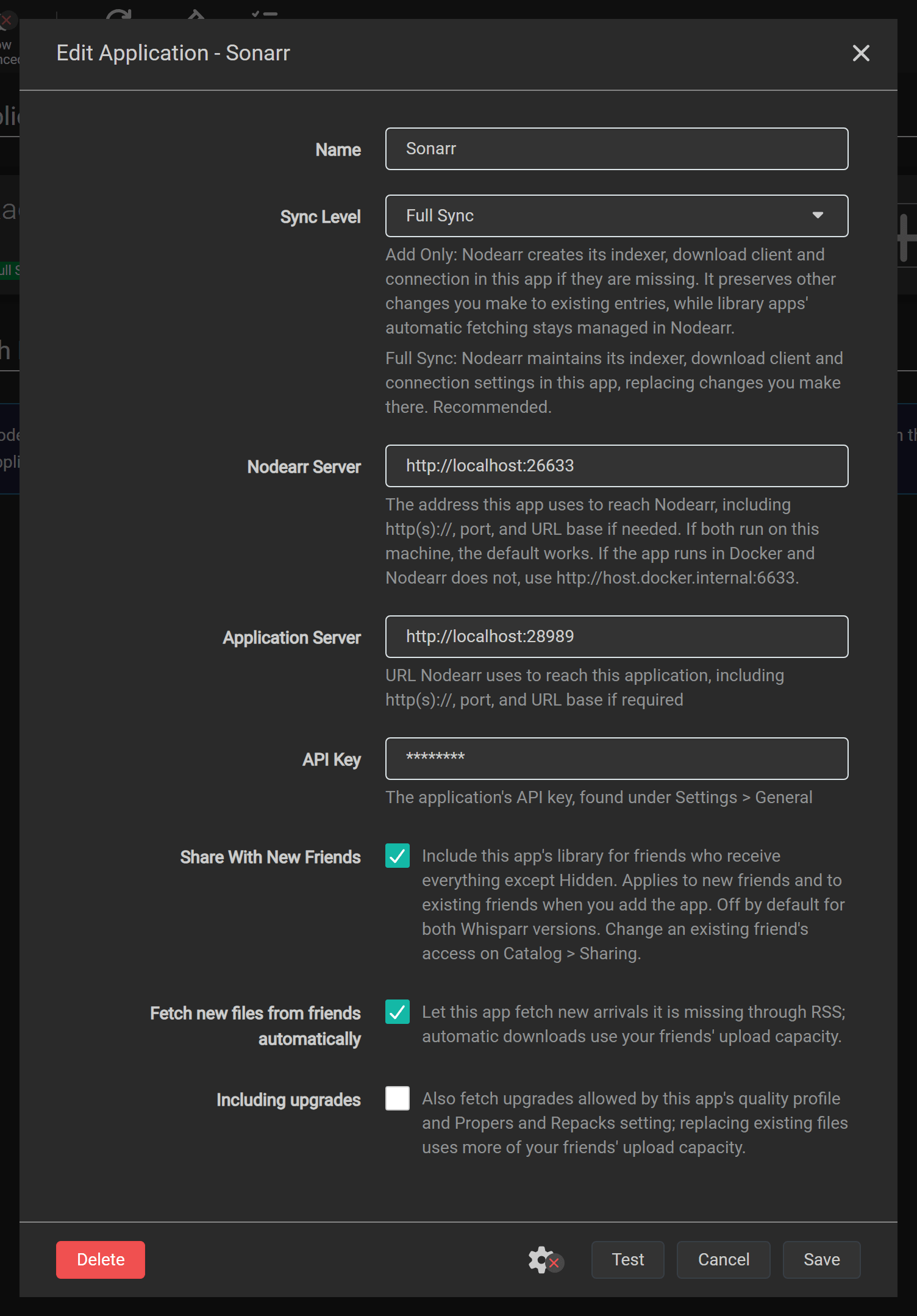
| Field | What it is |
|---|---|
| Name | A name you choose to identify this connection in Nodearr. |
| Sync Level | Leave Full Sync selected for setup. It maintains Nodearr’s indexer, download client and webhook settings in the app, replacing changes you make there. Add Only creates missing entries and preserves your changes to existing ones. Disabled stops library imports and registration updates. |
| Nodearr Server | The address the Arr app uses to reach Nodearr. The default works when both run on the same machine outside Docker. |
| Application Server | The address Nodearr uses to reach the Arr app. |
| API Key | The Arr app’s API key, found in that app under Settings > General. |
| Share With New Friends | Includes this app’s library when a friend is offered everything except Hidden. Applies to new friends and to existing friends when you add the app. Off by default for both Whisparr versions; on for other library apps. To change access for an existing friend, use the per-friend app choices on Catalog > Sharing. |
Advanced connection fields
| Field | What it is |
|---|---|
| Username, Password (advanced) | Credentials for a reverse proxy that requires HTTP Basic authentication. Leave these empty if the app is not behind such a proxy. |
| Download Category (advanced) | The category the app uses when sending downloads to Nodearr. |
| Sync Categories (advanced) | The categories the app searches on Nodearr’s indexer. |
The two server addresses point in opposite directions. Check both when an app runs in Docker or on another machine.
The defaults for each app
Section titled “The defaults for each app”| App | Default address | Needs at least |
|---|---|---|
| Sonarr | http://localhost:8989 |
3.0.5 |
| Radarr | http://localhost:7878 |
3.0 |
| Whisparr v3 | http://localhost:6969 |
3.0 |
| Whisparr v2 | http://localhost:6969 |
2.0, below 3.0 |
| Lidarr | http://localhost:8686 |
2.0 |
| Prowlarr | http://localhost:9696 |
1.0 |
Default download and search categories
| App | Download category | Searched in |
|---|---|---|
| Sonarr | tv |
5030, 5040, 5045, and 5070 for anime |
| Radarr | movies |
2030, 2040, 2045 |
| Whisparr v3 | whisparr |
6000, 6040, 6045, 6080, 6090 |
| Whisparr v2 | whisparr |
6000, 6040, 6045, 6080, 6090 |
| Lidarr | music |
3000, 3010, 3040 |
| Prowlarr |
Choose the Whisparr version you run. Both versions use the name Whisparr, but Nodearr has separate connection types for v2 and v3. Test reports a version mismatch if you choose the wrong one.
When the apps are in Docker
Section titled “When the apps are in Docker”Inside a container, localhost means that container. Choose the arrangement you use. These examples use Sonarr; substitute your app’s port and the service names from your Compose file.
Both on the host
Section titled “Both on the host”When both apps run directly on the same machine:
| Field | Value |
|---|---|
| Nodearr Server | http://localhost:6633 |
| Application Server | http://localhost:8989 |
Nodearr on the host
Section titled “Nodearr on the host”When Nodearr runs on the machine or uses Docker’s host network, and Sonarr runs in a bridge container:
| Field | Value |
|---|---|
| Nodearr Server | http://host.docker.internal:6633 |
| Application Server | http://localhost:8989, using Sonarr’s published host port |
The app’s port must be published on the host. On Linux, also add this to the Arr app’s service so it can resolve host.docker.internal:
extra_hosts: - "host.docker.internal:host-gateway"Both on a bridge
Section titled “Both on a bridge”When Nodearr and Sonarr use the same Docker bridge network:
| Field | Value |
|---|---|
| Nodearr Server | http://nodearr:6633 |
| Application Server | http://sonarr:8989 |
Use your Compose service names. Both containers must be on the same network for those names to resolve.
What Nodearr adds to each app
Section titled “What Nodearr adds to each app”For Sonarr, Radarr, Whisparr and Lidarr, Nodearr creates three entries named Nodearr in the Arr app:
- A download client under Settings > Download Clients, using the SABnzbd interface and the app’s download category. The app removes completed downloads from Nodearr after importing them.
- An indexer under Settings > Indexers, using Newznab and assigned to that download client. Automatic and interactive search are on. For new connections RSS is also on, so the app can fetch new arrivals it is missing from your friends.
- A webhook under Settings > Connect, which notifies Nodearr when the app imports, upgrades, renames or deletes files.
Prowlarr receives only an indexer; see Prowlarr.
Deleting a connection in Nodearr removes its imported catalog and tries to remove Nodearr’s entries from the Arr app. If the app is offline, remove those entries yourself when it is available. Nodearr keeps the entries if another connection still points to that same app.
Automatic fetching
Section titled “Automatic fetching”In Nodearr, go to Settings > Apps, open a library app and choose:
- Fetch new files from friends automatically: on for new connections. The app uses RSS to fetch files that arrive after the friend’s initial shared catalog and that it monitors and is missing. Automatic downloads use your friends’ upload capacity.
- Including upgrades: off by default, and shown when automatic fetching is on. Turn it on to also fetch upgrades allowed by the app’s quality profile and Propers and Repacks setting. Replacing existing files uses more of your friends’ upload capacity.
Select Save. Nodearr applies the choice to the app’s Enable RSS switch when it syncs the registration, including with Add Only. Set this in Nodearr; a later sync replaces changes made directly to that switch in the Arr app.
Existing connections keep their previous RSS choice. After upgrading, Nodearr reads the current switch at the next successful registration sync and saves it as the automatic-fetch setting. Upgrades start off. Prowlarr has neither control because it has no library.
Pairing does not automatically fetch a friend’s existing library. Search for those files in the Arr app, or use Get it in Nodearr. See How your Arr apps find it for the feed’s filtering and connection checks.
The two folders that have to line up
Section titled “The two folders that have to line up”Where transfers go
Section titled “Where transfers go”The Arr app must be able to read Nodearr’s completed downloads at the path Nodearr reports. Nodearr checks this through the app’s file browser and reports problems on System > Status.
- In Docker, mount one folder at the same path, such as
/downloads, in Nodearr and in every app. - Outside Docker, apps on the same machine usually use the same path. The default is
downloadsin Nodearr’s data folder. Change Download Folder under Settings > Node if needed. - If the app sees that folder at a different path, add a remote path mapping in the Arr app under Settings > Download Clients. Map the path Nodearr reports to the path the app can read.
When Nodearr sees the library at another path
Section titled “When Nodearr sees the library at another path”To send a library file to a friend, Nodearr reads the path reported by the Arr app. If that path differs from the one Nodearr can read, add a path mapping in Nodearr under Settings > Apps, in Path Mappings:
| Host | Remote path | Local path |
|---|---|---|
| The app’s host, as in its Application Server address | The path the app reports, such as /tv/ |
Where Nodearr finds it, such as D:\Media\TV\ |
Check Catalog > Local to see each file’s path and whether Nodearr can read it. System > Status warns about missing files and permission problems; see Friends are refused your files. These files can still appear in a friend’s catalog, but transfers fail until Nodearr can read them.
Each app
Section titled “Each app”Choose the app you are connecting. The connection steps and folder requirements above apply to every library app.
Sonarr
Section titled “Sonarr”Nodearr reads every series, episode and episode file. Sonarr searches Nodearr by the IDs it knows: TVDB, TMDb and IMDb, and the season and episode. When release groups use different episode numbering, Sonarr searches with those scene numbers. Daily shows use the air date. Anime searches use category 5070 and the same series IDs and episode numbers.
You can share a whole series, a season or single episodes.
Radarr
Section titled “Radarr”Nodearr reads every movie and its file. Radarr searches by TMDb and IMDb ID.
Whisparr v3 (Eros)
Section titled “Whisparr v3 (Eros)”Nodearr reads films and scenes, including their studio, release date, code and IDs. Whisparr v3 searches for films by TMDb ID and scenes by studio, date, title or code. It can find scenes shared by friends running either Whisparr v2 or v3, and Nodearr recognizes matching scenes across the two versions.
Adult content is found only by searches in the XXX categories, which Nodearr registers Whisparr with. Radarr’s normal movie categories leave it out, even for a film it also knows. This is category filtering, not a separate key for each app.
Share With New Friends is off by default for Whisparr v3. To share its library, enable it for new friends or select the app for an existing friend on Catalog > Sharing. You can also share individual titles through lists.
For titles sent by friends, Get it can add films and v3 scenes to Whisparr v3. It cannot add scenes originating from Whisparr v2; add those in Whisparr yourself and search there. See receiving a title.
Whisparr v2
Section titled “Whisparr v2”Nodearr reads each site’s scenes from Whisparr v2. Whisparr v2 searches for scenes by studio, date, title or code. It can find scenes shared by friends running either Whisparr v2 or v3, and Nodearr recognizes matching scenes across the two versions.
Adult content requires a search in the XXX categories, which Nodearr selects when registering its indexer in Whisparr v2. Radarr’s normal movie categories exclude it. This restriction depends on the search categories, not the calling app’s identity.
Share With New Friends is off by default for Whisparr v2. To share its library, enable it for new friends or select the app for an existing friend on Catalog > Sharing. You can also share individual scenes through lists.
Whisparr v2 webhooks identify the changed site rather than an individual scene, so Nodearr refreshes the full library after each change. Large libraries take longer to refresh.
Get it cannot add titles to Whisparr v2. Add the scene in Whisparr yourself, then search there for your friend’s copy. See receiving a title.
Lidarr
Section titled “Lidarr”Nodearr reads artists, albums and track files. You can share a whole artist or individual albums. An album is offered only when Lidarr has every track. Nodearr transfers the tracks into one folder and makes it available for import after every track has arrived and passed verification.
Lidarr searches by artist and album, as text, in the Audio categories. Albums are found only when an Audio category is requested. An album’s release title is the name Lidarr kept for the release, or Artist - Album (Year) [Quality].
Track names follow Lidarr’s default naming format, such as Slint - Spiderland - 01 - Breadcrumb Trail.flac. Multi-disc albums include the disc number, such as 1-01. If Rename Tracks is off in Lidarr, it preserves those names and imports the files directly into the artist’s folder. To use your own folder and file naming formats, turn on Rename Tracks in Lidarr under Settings > Media Management.
Prowlarr
Section titled “Prowlarr”Prowlarr manages indexers rather than a media library. Connecting it adds an indexer named Nodearr to Prowlarr, where you can search your friends’ offers alongside other indexers. Nodearr imports no library from Prowlarr.
Prowlarr’s copies of the Nodearr indexer are not assigned to Nodearr’s download client. Downloads through those copies could go to the wrong client and fail. To prevent this, Nodearr creates a sync profile named Nodearr in Prowlarr with RSS, automatic search and interactive search disabled. The indexers copied to your apps are therefore disabled.
Connect each library app directly to Nodearr using the connection steps at the start of this page. The app uses the indexer and download client registered by that direct connection.
Reading the library again
Section titled “Reading the library again”Nodearr refreshes each app’s library every 12 hours. Webhooks trigger a refresh of the affected title within seconds; Whisparr v2 triggers a full-library refresh instead.
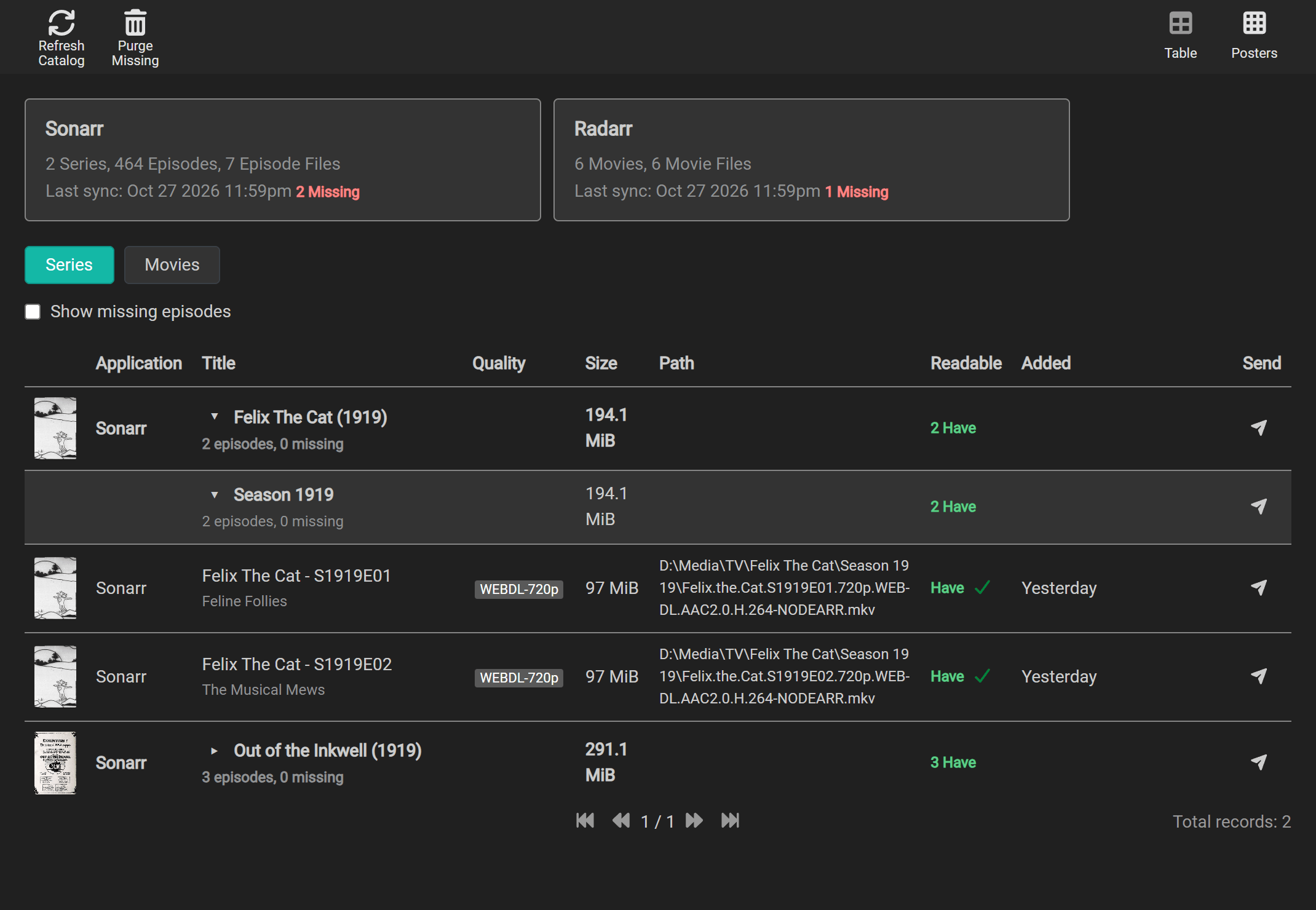
Catalog > Local has the same kind filters in Table and Posters: Series, Movies, Music when Lidarr is connected, and Scenes when Whisparr is connected. The selection is remembered on this page. In Table, a show opens into seasons, then episode files. A multi-episode file appears once with every episode it holds. Anime rows show absolute episode numbers; scene numbers appear alongside the TVDB numbers when they differ. Daily shows group by Sonarr’s season and show the air date. Specials (season 0) appear last. Show and season rows summarize episode count, missing episodes and total size.
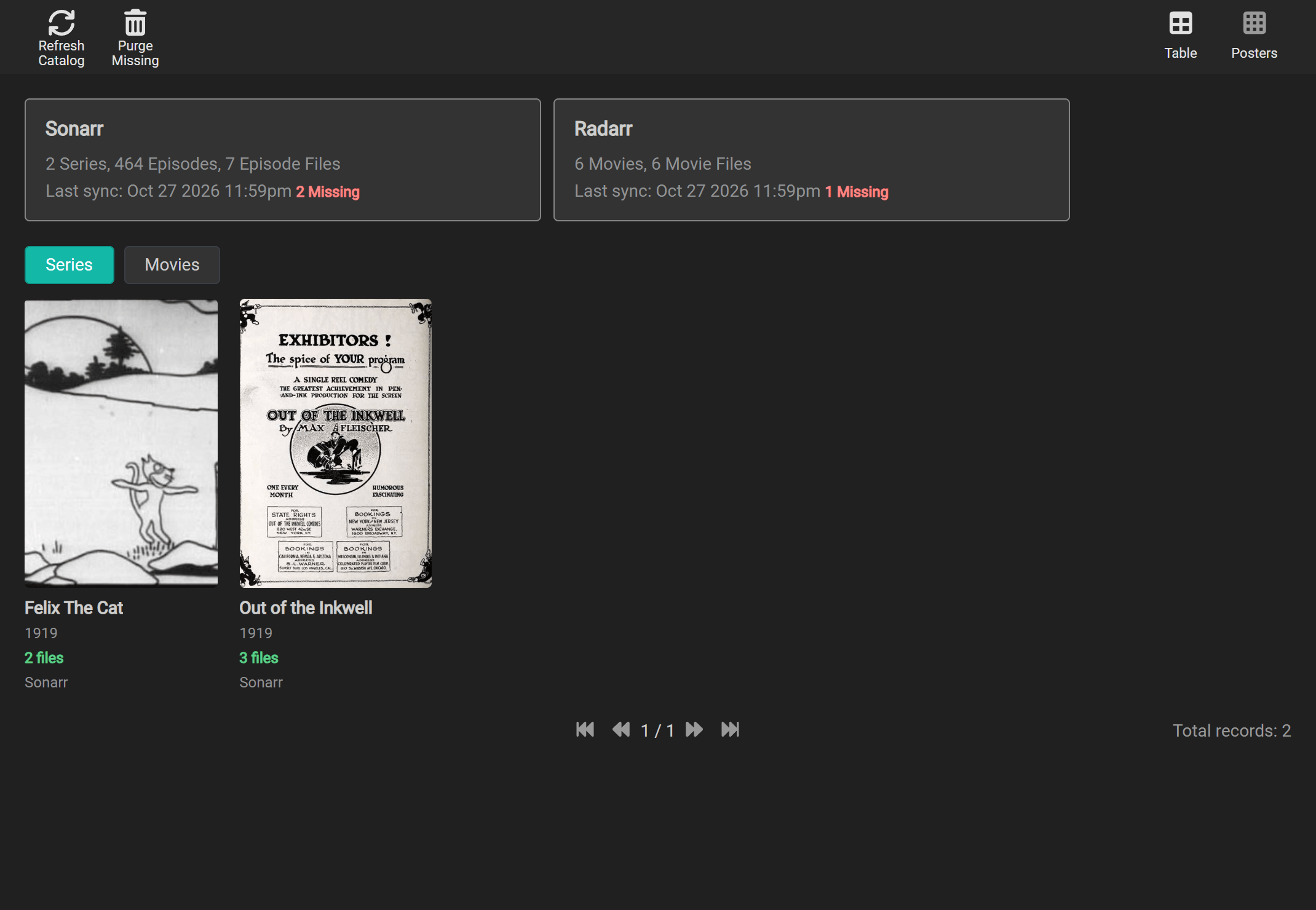
In Posters, the selected kind shows one tile per title with how many files it has. Music tiles use the album’s artist and square artwork.
Select a series, episode, movie, Whisparr film or scene poster or title to open its details card. The card shows what the connected Arr app last reported, including its description and the resolution of a file when available. If one file contains several episodes, choose the episode in the card. Use the arrow beside a series or season to expand its rows; Send stays a separate action. Lidarr details cards are planned separately.
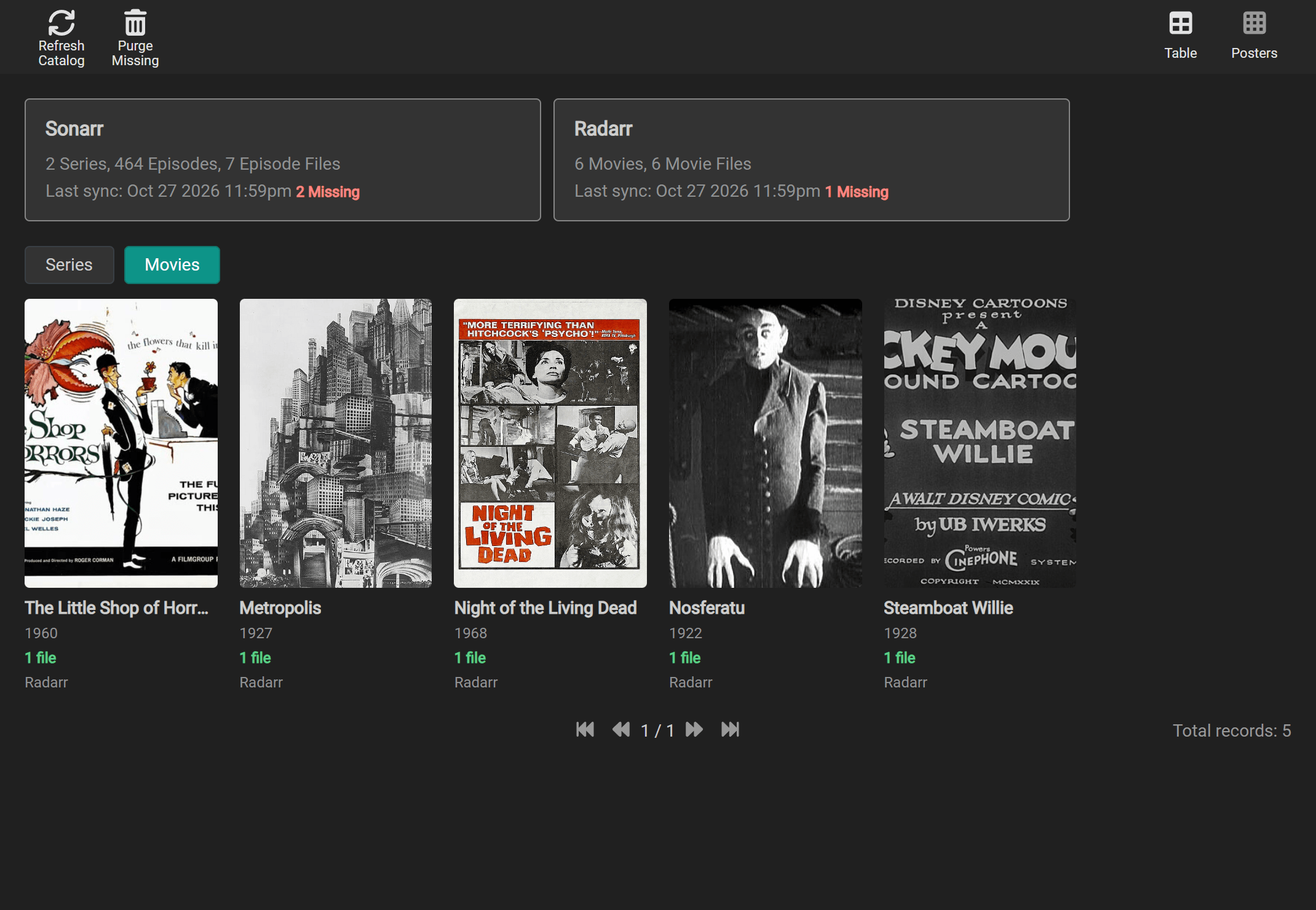
Choose Movies to see movie posters on their own:
To refresh all libraries now, go to Catalog > Local and select Refresh Catalog. Files an app no longer reports are marked missing, then removed from Nodearr’s catalog after 7 days. Select Purge Missing to remove those catalog entries immediately.